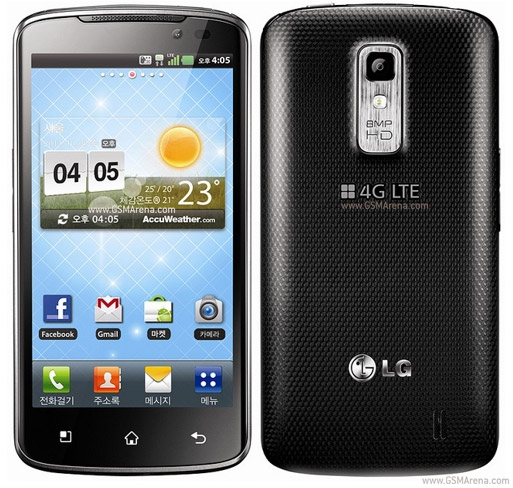
I recently got my hands on my first LG Android experience. LG Optimus SU640, also known as Nitro HD in US which goes with AT&T carrier.
Phone Specs:
LG Optimus LTE SU640 on GSM Arena.
Rooting Official ICS v20D firmware will allow you to debloat your device and eventually make it MUCH more responsive and make your battery last longer.
WARNING: I am not responsible if your device gets bricked , fails to boot, you lose your data etc. Although there is very low possibility of such happening if you follow my guide.
There are two methods i've found to be working on official ICS v20D for SU640.
Method 1 :
Here is what you need to do.
Method 2:
"Waiting for device to show up again [ali]...."
Wait for your device to boot-up . then Press "Enter"
If the process does not move forward, Press "Ctrl + C"
Press "n" for "No" and the process will proceed.
Do not install CWM on your phone yet, ICS does not allow CWM flashing on mmcblk0p13 Block. You will end up bricking it and will be presented with a pretty message.
"Security breech"
"Long time no see"
Phone Specs:
LG Optimus LTE SU640 on GSM Arena.
Rooting Official ICS v20D firmware will allow you to debloat your device and eventually make it MUCH more responsive and make your battery last longer.
WARNING: I am not responsible if your device gets bricked , fails to boot, you lose your data etc. Although there is very low possibility of such happening if you follow my guide.
There are two methods i've found to be working on official ICS v20D for SU640.
Method 1 :
Here is what you need to do.
- Download Root20D.rar
- Extract Root20D.rar to "C:\Root20D"
- Connect your LG SU640 to your computer.
- Goto "Settings >> Security "
- Check "Unknown Sources"
- Goto "Settings >> Developer Options
- Check "USB Debugging"
- Make sure you are connected in "LG Software Mode"
- Execute "En_Step1.bat"
- Follow the on screen instructions and be patient :)
- if it doesn't succeed the first time, do not give up. Just restart from Step 2.
Method 2:
- Download Root_.rar
- Extract Root_.rar to "C:\Root_ICS"
- Connect your LG SU640 to your computer.
- Goto "Settings >> Security "
- Check "Unknown Sources"
- Goto "Settings >> Developer Options
- Check "USB Debugging"
- Make sure you are connected in "LG Software Mode"
- Execute RunMe.bat
- Select "Normal Mode"
- Follow the on screen instructions and be patient :)
"Waiting for device to show up again [ali]...."
Wait for your device to boot-up . then Press "Enter"
If the process does not move forward, Press "Ctrl + C"
Press "n" for "No" and the process will proceed.
Do not install CWM on your phone yet, ICS does not allow CWM flashing on mmcblk0p13 Block. You will end up bricking it and will be presented with a pretty message.
"Security breech"
"Long time no see"


